Bring Your WordPress Property Pages Into AI-Readable Discovery
HomeSelf VPR Connector is now available on WordPress.org. Connect your property pages to canonical Verified Property Records and expose structured references that AI systems, crawlers, and assistants can understand.
Official WordPress.org plugin. Human-facing pages stay on your website. AI-readable VPR data stays canonical on HomeSelf.
From search to selection
Traditional property search returns long lists of options. AI-mediated discovery works differently: users describe intent, constraints, preferences, and context.
HomeSelf VPR Connector links your WordPress page to a canonical AI-readable property record designed to support structured comparison, citation, and explanation.
Traditional search
Filter-based discovery
AI-mediated discovery
Intent-based selection
How the WordPress connector works
Three steps to connect your WordPress property pages to canonical AI-readable VPRs.
Create or publish a VPR on HomeSelf
Create your canonical Verified Property Record with all property details, photos, amenities, and booking information.
Install the HomeSelf VPR Connector from WordPress.org
Install the plugin directly from WordPress.org to connect your site to HomeSelf.
Add the VPR to each WordPress property page
Use the shortcode or block to display the VPR card, structured reference, and AI prompt on your property page.
WordPress displays and references the VPR. The canonical record lives on HomeSelf where AI systems can access it directly. Updates to the VPR on HomeSelf automatically reflect in WordPress display.
One VPR ID per property page
Test whether AI assistants can discover and understand your hotel using the AI Hotel Discovery Simulator.
Try the AI Hotel Discovery SimulatorBuilt for hospitality and real estate
The WordPress connector serves property businesses across hospitality and real estate.
Hotels and direct booking websites
Make your direct booking website easier for AI assistants to understand by exposing room, location, trust, and booking context through a canonical HomeSelf VPR.
Hotels →Property managers
Connect property pages across your portfolio to canonical VPRs and prepare each unit for AI-mediated discovery.
Property managers →Real estate agencies
Turn sale and rental property pages into AI-readable decision records that AI systems can compare by location, price position, suitability, and trust signals.
Real estate →Short-term rentals
Help AI assistants understand who your villa, apartment, B&B, or aparthotel is best suited for with structured property data.
Short-term rentals →What appears on your WordPress page
The connector can display a lightweight HomeSelf VPR card inside an existing WordPress property page. Visitors can open the canonical AI-readable record or copy an AI prompt, while your website design, PMS, booking engine, and SEO stack remain unchanged.
The design of your site remains yours.
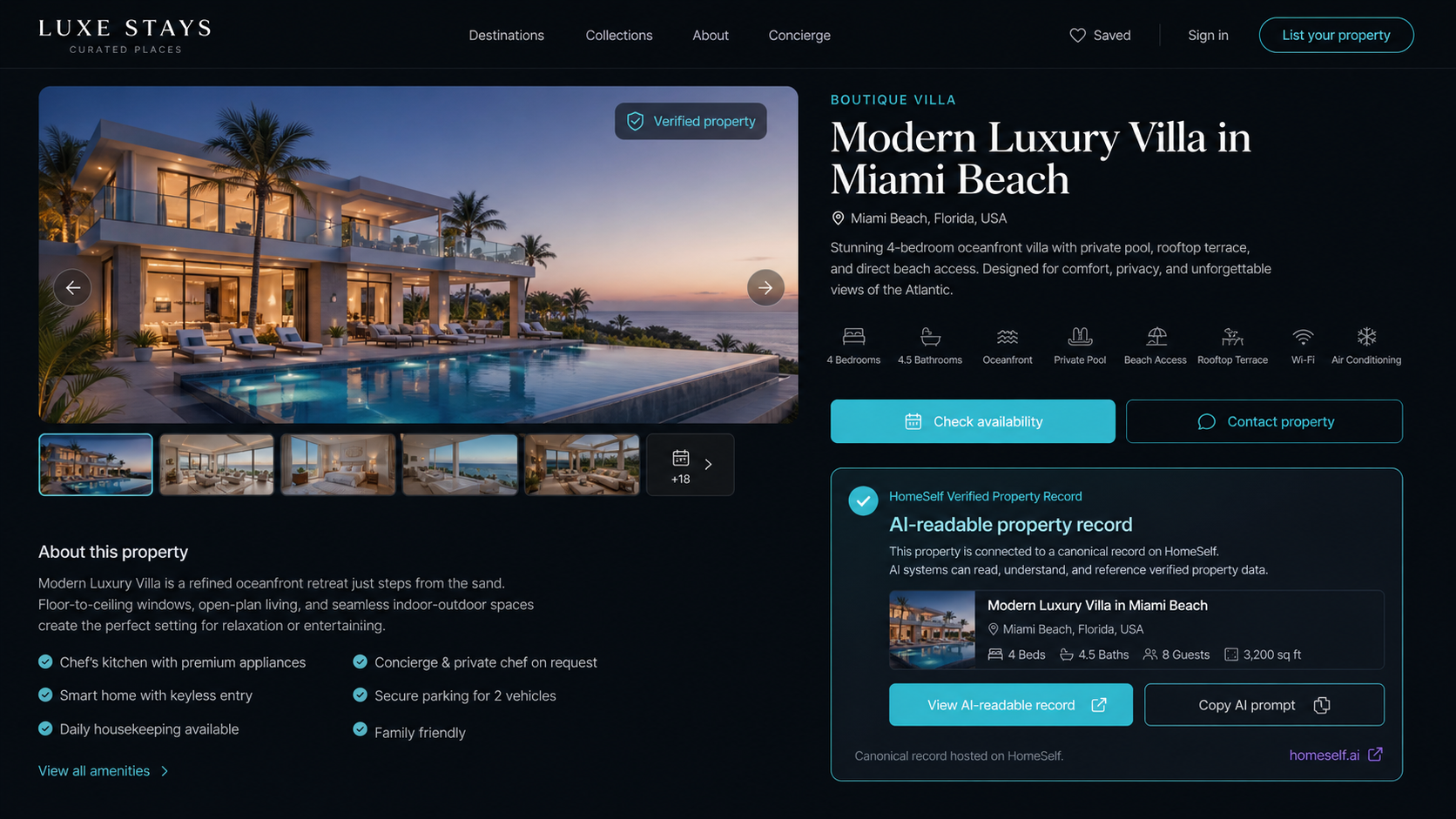
Example frontend placement: the VPR card appears inside the property page while the canonical AI-readable record remains on HomeSelf.
Sea View Apartment
Example VPR card as it appears on a WordPress page
Works with the tools property teams already use
Add the connector using the native WordPress editor block, Elementor widget, or shortcode. The VPR remains canonical on HomeSelf; WordPress displays and references it.
From traffic metrics to AI discovery metrics
Traditional websites measure visits, clicks, and conversions. AI-mediated discovery introduces new questions: was the property exposed, evaluated, selected, and acted on?
A property was retrieved, considered, or evaluated by an AI system.
How often a property is selected by AI after being evaluated for a user intent.
How often people take action after arriving from an AI recommendation or AI-assisted journey.
A signal of data reliability, completeness, evidence quality, and consistency.
The connector prepares and exposes the property record. ASR and HSR reporting require HomeSelf analytics and may not be available in the connector MVP.
A connector, not a replacement for your stack
The WordPress connector works alongside your existing tools and systems.
What it does
- •Connects WordPress property pages to canonical HomeSelf VPRs
- •Displays a VPR card or badge
- •Adds a structured reference to the page
- •Provides copyable AI prompts
- •Links back to the canonical HomeSelf record
What it does not do
- •Does not replace your PMS
- •Does not replace your booking engine
- •Does not replace your SEO plugin
- •Does not create VPRs from WordPress in the MVP
- •Does not sync WordPress data to HomeSelf in the MVP
- •Does not guarantee AI visibility or bookings
- •Does not store private verification documents in WordPress
Setup in five steps
Get your WordPress property pages connected to HomeSelf VPRs in minutes.
Works with the WordPress editor, Elementor, and shortcodes.
Install from WordPress.org
Download and install the HomeSelf VPR Connector directly from WordPress.org.
Paste your VPR URL or Property ID
Create a VPR on HomeSelf first, then paste the URL or ID into the plugin settings.
Test the connection
Verify the plugin can successfully connect to your VPR and display property data.
Copy the shortcode
Use the generated shortcode to place the VPR card anywhere on your property page.
Add to your WordPress page
Paste the shortcode into your property page content or use it in your template.
Official WordPress.org listing. Direct ZIP download is also available from HomeSelf.
Frequently Asked Questions
Answers to common questions about HomeSelf and AI-native property infrastructure.
Ask AI about this plugin
Copy a prompt and use it with your preferred AI assistant or AI search experience to understand whether the connector fits your property business.
Note: Direct LLM integration depends on each platform's URL parameter support. Copy the prompt as a reliable alternative.
Start with one property page.
Create a VPR, connect it to WordPress, and make the property easier for AI systems to understand, compare, cite, and explain.